Analyzing Amadey - Part 1
Background
I recently learned about Samplepedia, which is a curated collection of malware samples for learning malware analysis. Each sample is tagged with a difficulty level and some additional metadata like you might see on VirusTotal or on MalwareBazaar. Each one also has a specific goal for the analysis.
At the moment, I'm focusing on brushing up my malware analysis skills in general. I figured I would pick an easy sample to start with and then work my way towards more difficult ones. The sample I'm analyzing in this blog post is available on Samplepedia here. The goal is to reverse engineer it and mark it up in a decompiler. I'll start with basic static and dynamic analysis first, then we'll dive into the code. This blog post is a walkthrough of my process.
The file analyzed in this post has the following SHA256 hash: aad0a60cb86e3a56bcd356c6559b92c4dc4a1a960f409fb499cf76c9b5409fdb.
Basic Static Analysis: What Am I Looking At?
Since this is known to be malware, I started by looking at what existing intel sources say about this sample.
I started with the page on Malware Bazaar, since that's where I downloaded the sample from.
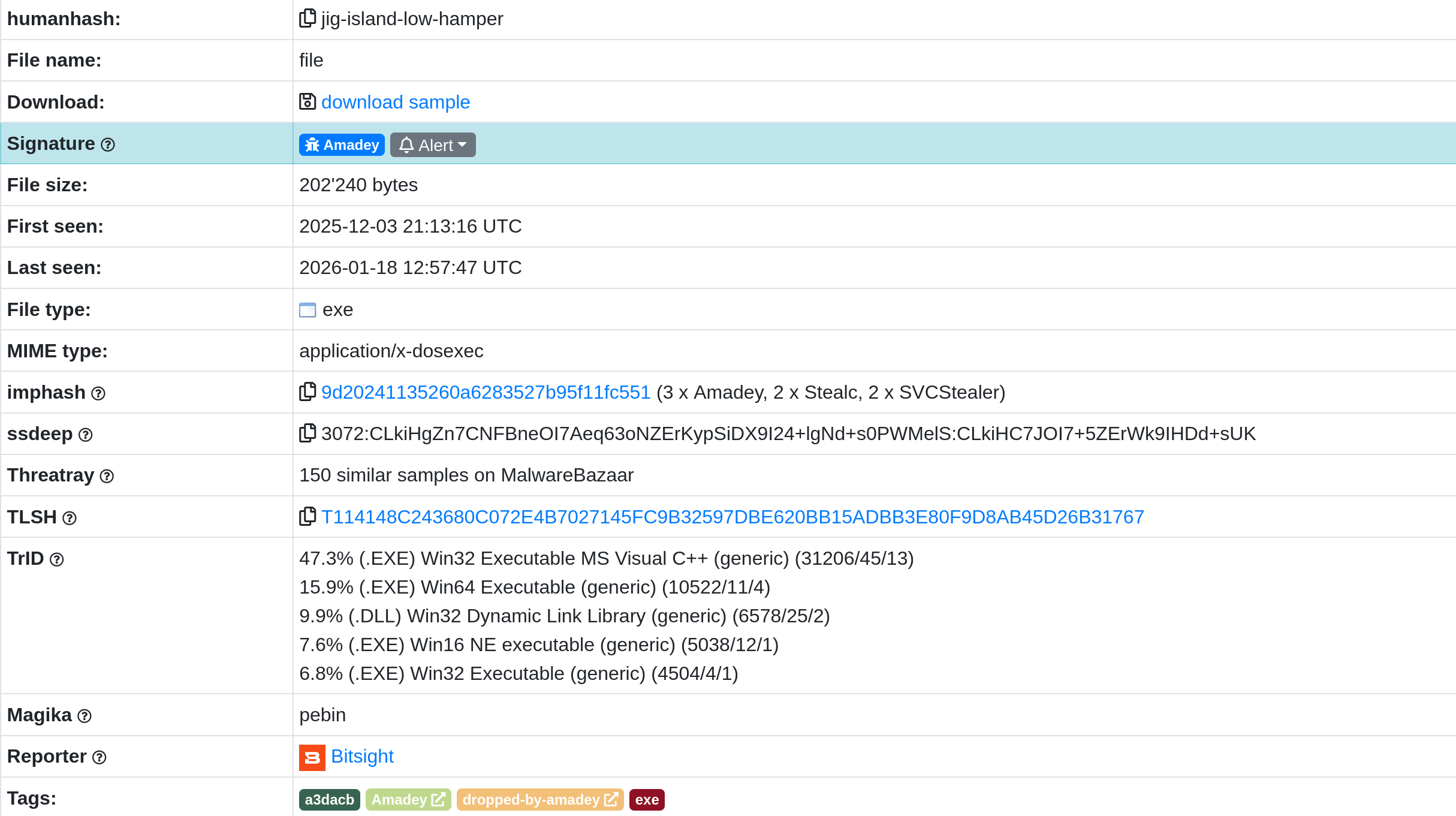
It looks like this is a Windows PE file, likely written in C++. That lines up with the metadata that Samplepedia provides. The VirusTotal page reports the same thing.
What's interesting is that both sites relate this sample to Amadey, which is a modular Windows infostealer. I did some searching for background information on it and read this Any.Run write-up.
So, with some initial hypotheses about what I might be looking at, I loaded up the sample in a VM and started investigating.
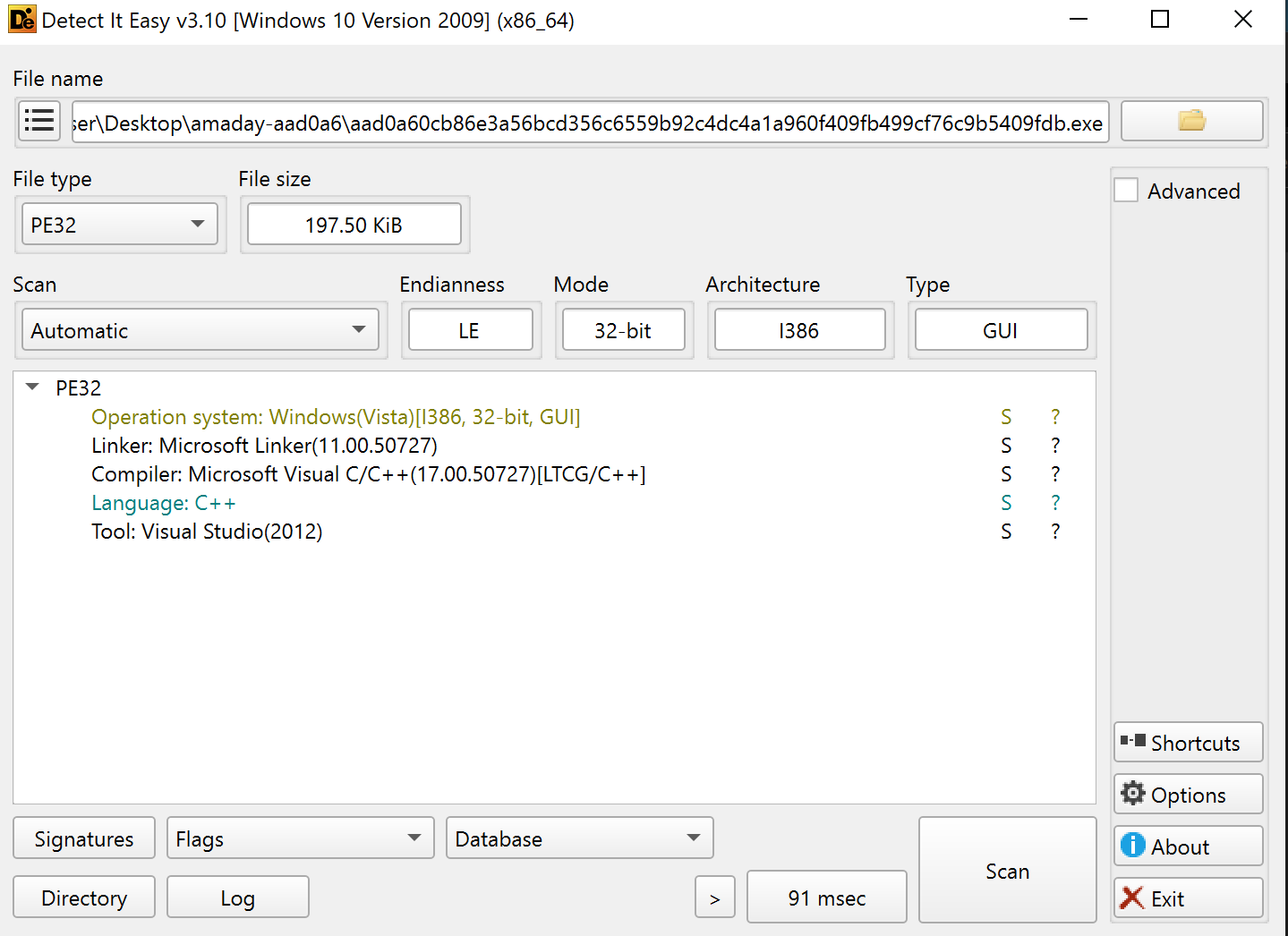
The first thing I did was throw it into Detect It Easy to confirm some basic information about it. It does indeed appear to be written in C++. It's also a 32-bit binary.
The next thing I wanted to do was get a quick overview of the things that this sample might do in order to guide further analysis. That meant looking at strings, imports, and output from capa.
Reviewing the Imports
I loaded the sample into PEStudio and looked through the imports that it was able to parse out. PEStudio helpfully flagged some that might be of interest. Functions like CheckTokenMembership and AllocateAndInitializeSid are immediately interesting - maybe this sample tries to determine if it has administrator permissions or otherwise tinkers with user permissions?
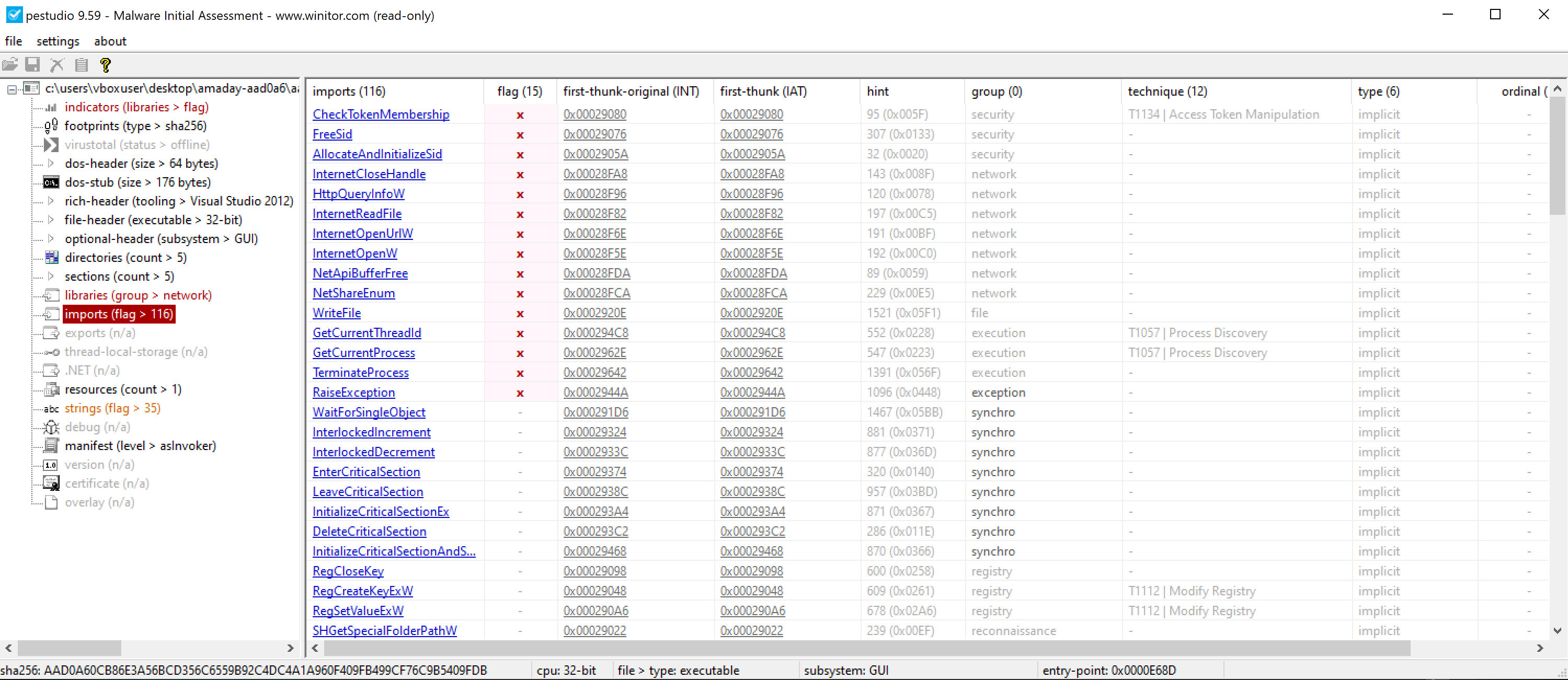
There are also some imports from wininet that might indicate how this sample makes network connections. I noted that InternetOpenUrlW and InternetReadFile would be good targets to look for when doing deeper static analysis.
There are some functions for registry modification (RegCreateKeyExW, RegSetValueExW), so I also flagged those for further analysis. Maybe this sample abuses the registry for persistence?
NetShareEnum is another interesting import. Just like it says on the tin, it enumerates information about network shares. That seems like a reasonable thing for an infostealer-adjacent piece of malware to do, so I noted that down for further investigation later.
Some other functionality that I flagged from the imports were potential anti-debugging functions (GetTickCount, IsDebuggerPresent, and QueryPerformanceCounter), COM object usage (CoInitialize, CoCreateInstance), and runtime imports (LoadLibrary, GetProcAddress).
Closer inspection is required, of course, but the imports gave me a good idea of what this sample might do along with several interesting starting points.
Strings
I ran FLOSS to identify any interesting human-readable strings that were in the binary. It pulled out several strings that matched the imports I looked at previously, so I'll skip listing those again and focus on the more interesting strings in this section.
This sample contains some strings indicating that clipboard interaction APIs are used. These didn't appear in the imports table, so they may be imported at runtime.
SetClipboardData
User32.dll
EmptyClipboard
OpenClipboard
GetClipboardData
CloseClipboard
There are also some interesting regex strings:
\b(1|3|bc1)[a-zA-HJ-NP-Z0-9]{25,42}\b
\b0x[a-fA-F0-9]{40}\b
\bT[a-zA-HJ-NP-Z0-9]{33}\b
\b(L|M)[a-zA-HJ-NP-Z0-9]{26,33}\b
Some quick searching revealed that these are likely for matching cryptocurrency addresses. Later on, this binary contains some strings that appear to match those regexes.
1DXc1eazyWTHTq6JMdURSqqrFGTzGL8eF1
0xb49a8bad358c0adb639f43c035b8c06777487dd7
TY4iNhGut31cMbE3M6TU5CoCXvFJ5nP59i
LedxKBWF4MiM3x9F7zmCdaxnnu8A8SUohZ
There's also the text for what appears to be an autorun.inf file. This may be a method for spreading the malware.
[autorun]
open=Update.exe
icon=shell32.dll,4
Finally, FLOSS pulled out some very interesting UTF-16-LE strings:
Update.exe
Document.pdf.exe
Photo.jpg.exe
Setup.exe
autorun.inf
Documents Backup.lnk
Double-click to view contents
shell32.dll
Downloader
http://%s/%d.exe
%s%d_%d.exe
txtfile\shell\open\command
"%s" "%%1"
\Windows\
\Program Files\
\Program Files (x86)\
\System32\
\SysWOW64\
\AppData\Local\
\AppData\LocalLow\
\AppData\Roaming\
\Temporary Internet Files\
\localhost\
62.60.226[.]159
There are some interesting file names - Update.exe, Document.pdf.exe, Photo.jpg.exe, and Setup.exe - that look like they might be attempting to blend in or trick a victim into running them. There are some format strings which seem to be related to HTTP activity and warrant further inspection.
FLOSS also identified the string txtfile\shell\open\command, which looks interesting. A quick search for that string reveals the MITRE ATT&CK technique page for changing the default file association. It looks like this malware might add itself as a handler for text files to achieve persistence.
And finally, there's an IP address. Several vendors mark it as malicious on VirusTotal. Analyzing the traffic that flows to this IP address will be one of the main goals of the upcoming in-depth analysis. As a side note, that IP address was not defanged in the binary; that's a change I made for this post.
I was able to get quite a bit of information from just looking at the imports and strings. If this binary was packed or had more obfuscation, that would have been much harder.
capa Results
Finally, capa is a great tool for quickly determining the capabilities of a sample. I like to use it to find any interesting features that warrant more investigation.
Here's a snippet of the output from capa:
┌───────────────────────┬──────────────────────────────────────────────────────────────────────────┐
│ ATT&CK Tactic         │ ATT&CK Technique                                                         │
├───────────────────────┼──────────────────────────────────────────────────────────────────────────┤
│ DEFENSE EVASION       │ File and Directory Permissions Modification [T1222]                      │
│                       │ Obfuscated Files or Information [T1027]                                  │
│ DISCOVERY             │ File and Directory Discovery [T1083]                                     │
│                       │ Network Share Discovery [T1135]                                          │
│                       │ System Information Discovery [T1082]                                     │
│                       │ System Location Discovery [T1614]                                        │
│                       │ System Owner/User Discovery [T1033]                                      │
│ EXECUTION             │ Shared Modules [T1129]                                                   │
│ PERSISTENCE           │ Boot or Logon Autostart Execution::Shortcut Modification [T1547.009]     │
│                       │ Event Triggered Execution::Change Default File Association [T1546.001]   │
└───────────────────────┴──────────────────────────────────────────────────────────────────────────┘
┌───────────────────────────────────────────────────────────────┬──────────────────────────────────┐
│ MAEC Category                                                 │ MAEC Value                       │
├───────────────────────────────────────────────────────────────┼──────────────────────────────────┤
│ malware-category                                              │ downloader                       │
│                                                               │ launcher                         │
└───────────────────────────────────────────────────────────────┴──────────────────────────────────┘

┌───────────────────────────────────────────────────────┬──────────────────────────────────────────┐
│ Capability                                            │ Namespace                                │
├───────────────────────────────────────────────────────┼──────────────────────────────────────────┤
│ get geographical location                             │ collection                               │
│ parse credit card information                         │ collection/credit-card                   │
│ receive and write data from server to client          │ communication/c2/file-transfer           │
│ check HTTP status code                                │ communication/http/client                │
│ encode data using XOR                                 │ data-manipulation/encoding/xor           │
│ hash data using fnv                                   │ data-manipulation/hashing/fnv            │
│ get common file path (3 matches)                      │ host-interaction/file-system             │
│ copy file (5 matches)                                 │ host-interaction/file-system/copy        │
│ delete file                                           │ host-interaction/file-system/delete      │
│ check if file exists (5 matches)                      │ host-interaction/file-system/exists      │
│ enumerate files recursively                           │ host-interaction/file-system/files/list  │
│ get file attributes (7 matches)                       │ host-interaction/file-system/meta        │
│ get file size                                         │ host-interaction/file-system/meta        │
│ set file attributes (6 matches)                       │ host-interaction/file-system/meta        │
│ read file on Windows                                  │ host-interaction/file-system/read        │
│ write file on Windows (2 matches)                     │ host-interaction/file-system/write       │
│ get disk information (2 matches)                      │ host-interaction/hardware/storage        │
│ print debug messages                                  │ host-interaction/log/debug/write-event   │
│ enumerate network shares                              │ host-interaction/network                 │
│ create process on Windows                             │ host-interaction/process/create          │
│ get token membership (2 matches)                      │ host-interaction/session                 │
│ create thread                                         │ host-interaction/thread/create           │
│ get kernel32 base address                             │ linking/runtime-linking                  │
│ get ntdll base address                                │ linking/runtime-linking                  │
│ link many functions at runtime (2 matches)            │ linking/runtime-linking                  │
│ linked against CPP standard library                   │ linking/static                           │
│ linked against CPP regex library                      │ linking/static/cppregex                  │
│ parse PE header                                       │ load-code/pe                             │
│ resolve function by parsing PE exports (2 matches)    │ load-code/pe                             │
│ create shortcut via IShellLink                        │ persistence                              │
│ persist via default file association registry key     │ persistence/registry                     │
└───────────────────────────────────────────────────────┴──────────────────────────────────────────┘
I usually run just capa to start with, and then I dump the output of capa -v (or -vv) to a file. The verbose output includes the addresses of functions or basic blocks that contain the capabilities that the tool identifies.
Several of the things that capa identified aligned with my guesses from looking at the imports: HTTP calls, getting the user's access token, and runtime linking. There are also a few interesting things that capa caught, such as getting geographic and credit card information. These are all good features to dig into with further analysis.
Basic Dynamic Analysis
Now that I had an idea of what this sample might do, it was time to detonate it.
My malware analysis lab consists of two virtual machines at the moment. I have a Windows 10 VM with the FLARE-VM tools installed for analyzing and running the malware. I also have a REMnux VM that I use for monitoring the network traffic leaving the Windows machine. The two VMs are connected with Virtualbox's host-only networking. This allows me to send traffic between the two machines, but neither can reach the internet. It's a good balance of functionality and safety.
Before detonating the sample, there are a few things I always check:
- I have a clean snapshot to revert to in the Windows VM
- Procmon is running on the Windows VM
- INetSim and Wireshark are running in the REMnux VM
Procmon will capture interesting events happening on the host, while Wireshark will capture network traffic leaving the Windows machine. INetSim will send dummy responses to requests from several different protocols, allowing the malware to run somewhat normally.
Now that everything is set up, let's detonate!
Filesystem Activity
I ran the sample as a non-Administrator user by double-clicking it from the desktop. The first thing that I noticed after executing it was a file called Update.exe dropped to the desktop. Upon looking closer, the malware seems to write Update.exe recursively to every folder on the desktop. Not very subtle. Procmon shows all of the operations happening:
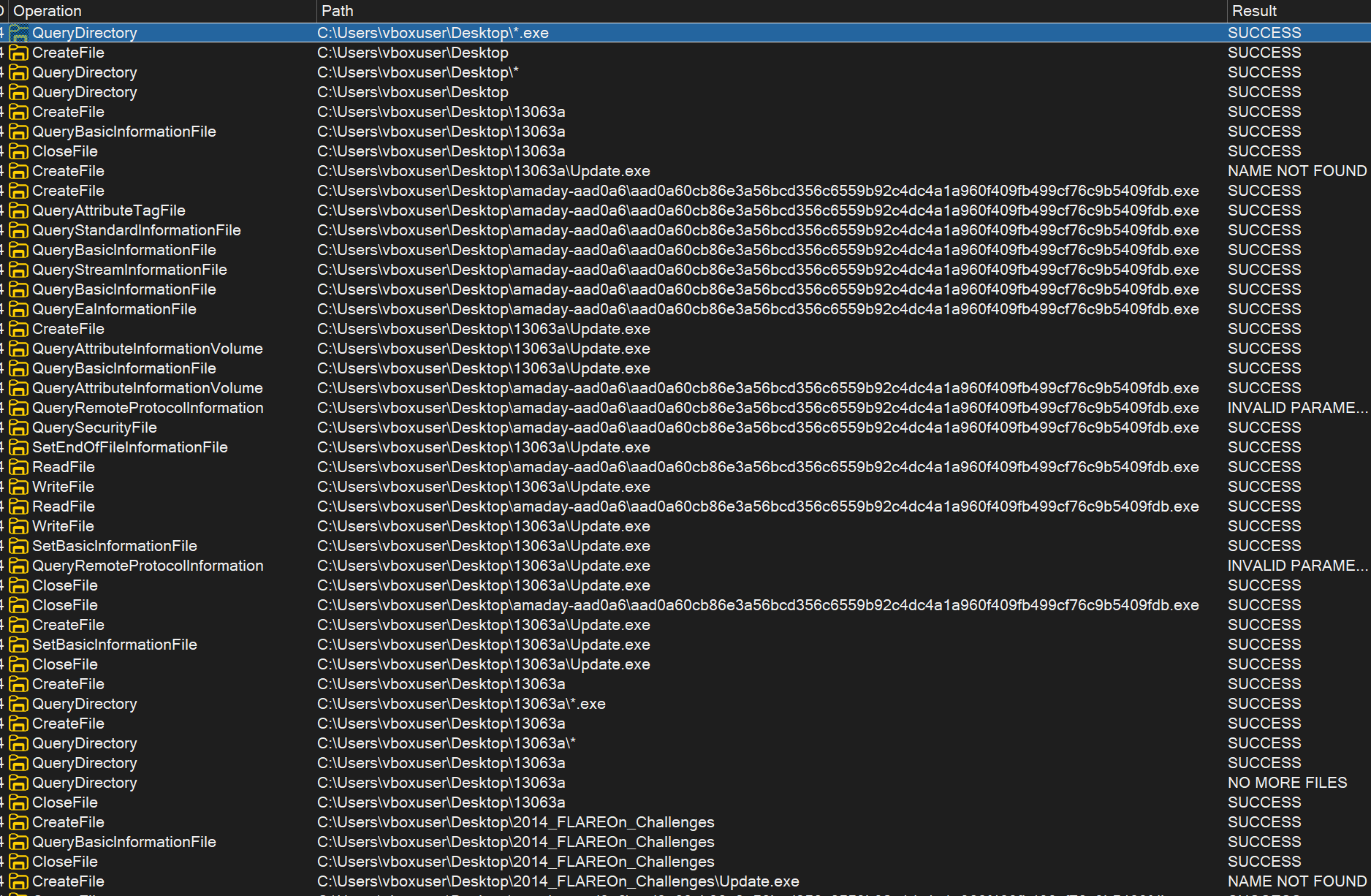
The hashes for these Update.exe files are the same as the sample we're looking at, so the malware is just copying itself.

After investigating Update.exe, I looked for other interesting events logged in Procmon. I filtered out everything except for the CreateFile event to look for other files dropped to the system.

I noticed several of those interesting strings that I identified earlier. The malware attempts to create Document.pdf.exe, Photo.jpg.exe, Setup.exe, autorun.inf, and the ubiquitous Update.exe to the A: drive, and presumably other drives that may be connected to the machine. In this instance, drive A is just a virtual drive from VirtualBox.
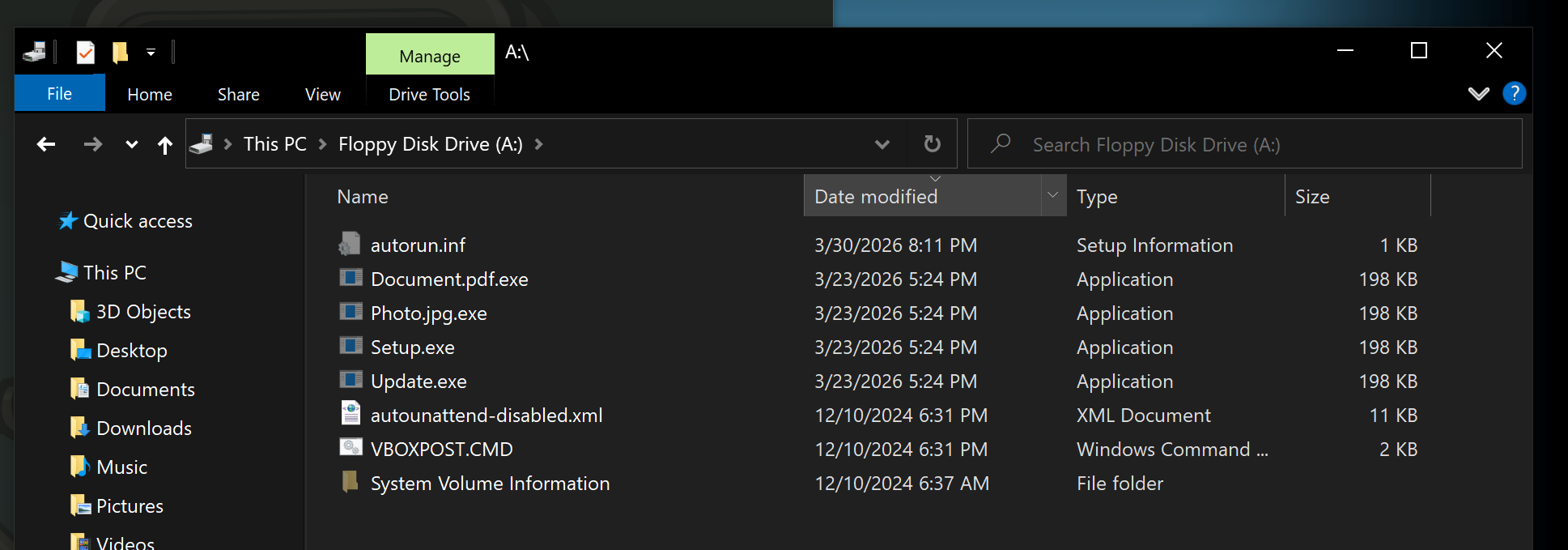
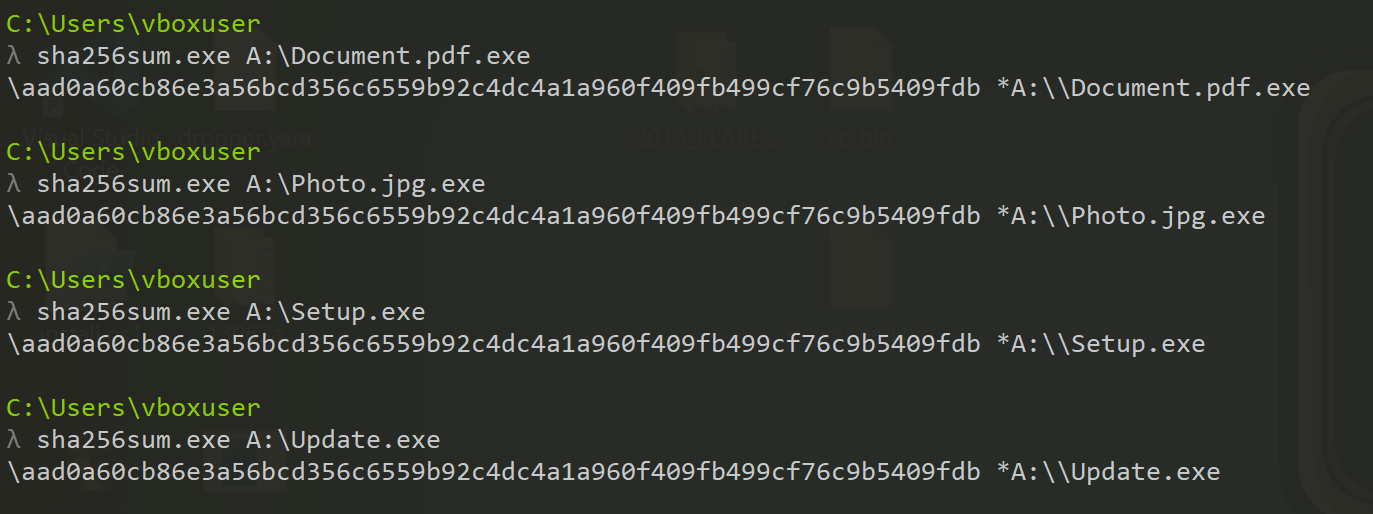
All of the .exe files have the same hash; it's the same hash as the sample itself. This malware copied itself to the removable drive under four different names in an attempt to get an unsuspecting victim to launch one of them.
The contents of the autorun.inf file match the interesting data I found in the strings output earlier:
[autorun]
open=Update.exe
icon=shell32.dll,4
Based on a quick search, it looks like the icon that will be displayed to the user is the empty folder icon.
This is a fairly straightforward mechanism for spreading the malware. Considering the NetShareEnum function imported, my hypothesis was that this malware would attempt to copy itself to every network share it could find. I had none available in my lab VM, so that's something to save for further analysis.
Registry Activity
I didn't actually find much interesting registry activity from the events logged in Procmon. I didn't see the txtfile\shell\open\command key that appeared in the strings output, and I didn't see any modification to the Run keys. Deeper analysis was required to determine what registry activity, if any, this malware does.
Network Traffic
I looked at the network traffic next. This sample did not do much, frankly. It repeatedly tried to open a TCP connection to the IP address we saw earlier on port 80:
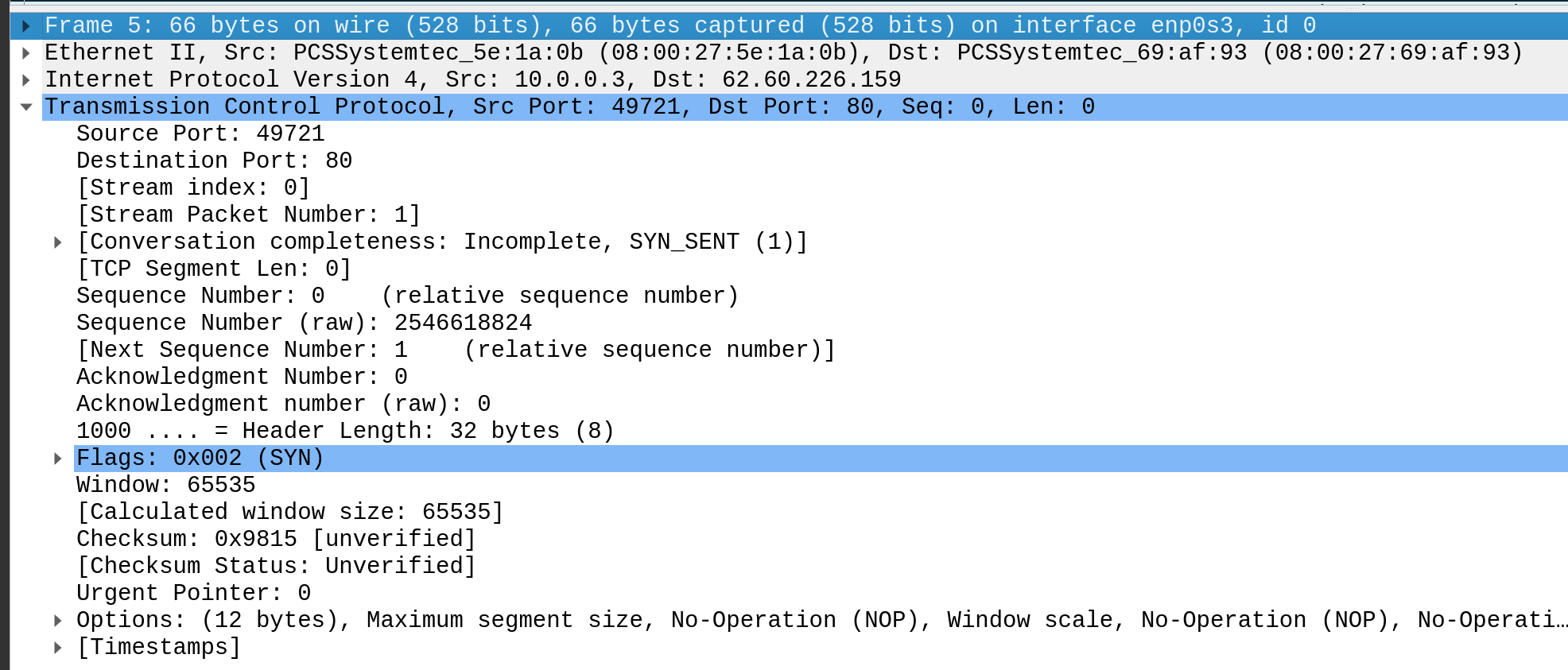
INetSim won't respond to traffic from that IP address, so the connection did not complete successfully. That means I had to tweak my setup a bit and do some more digging.
Basic Dynamic Analysis... 2!
The network traffic I picked up in Wireshark wasn't very exciting, and I wanted to fix that. I'm jumping ahead a little here, but a closer look into the sample with Ghidra revealed that the IP address is only used in one spot:

I decided to just patch the binary and replace that IP address with the IP of my REMnux VM. There may have been a better solution, but this one worked fairly well.
After learning how to patch & save binaries in Ghidra (make patches as needed, File > Export Program > save as raw bytes), I copied my new binary over to the Windows VM, set up my analysis tools, and ran it again.
This time, Wireshark picked up more interesting traffic:
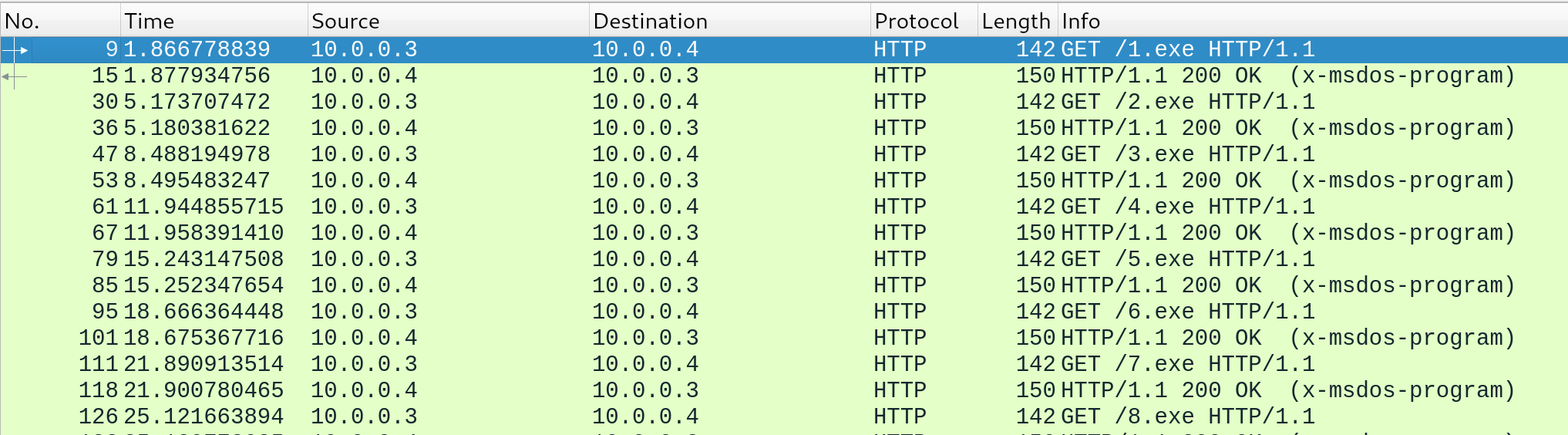
The malware was making HTTP GET requests to <lab IP>/<number>.exe, where the number started at 1 and incremented each time. The malware made a new request every few seconds.
In the Windows VM, it looked like this:
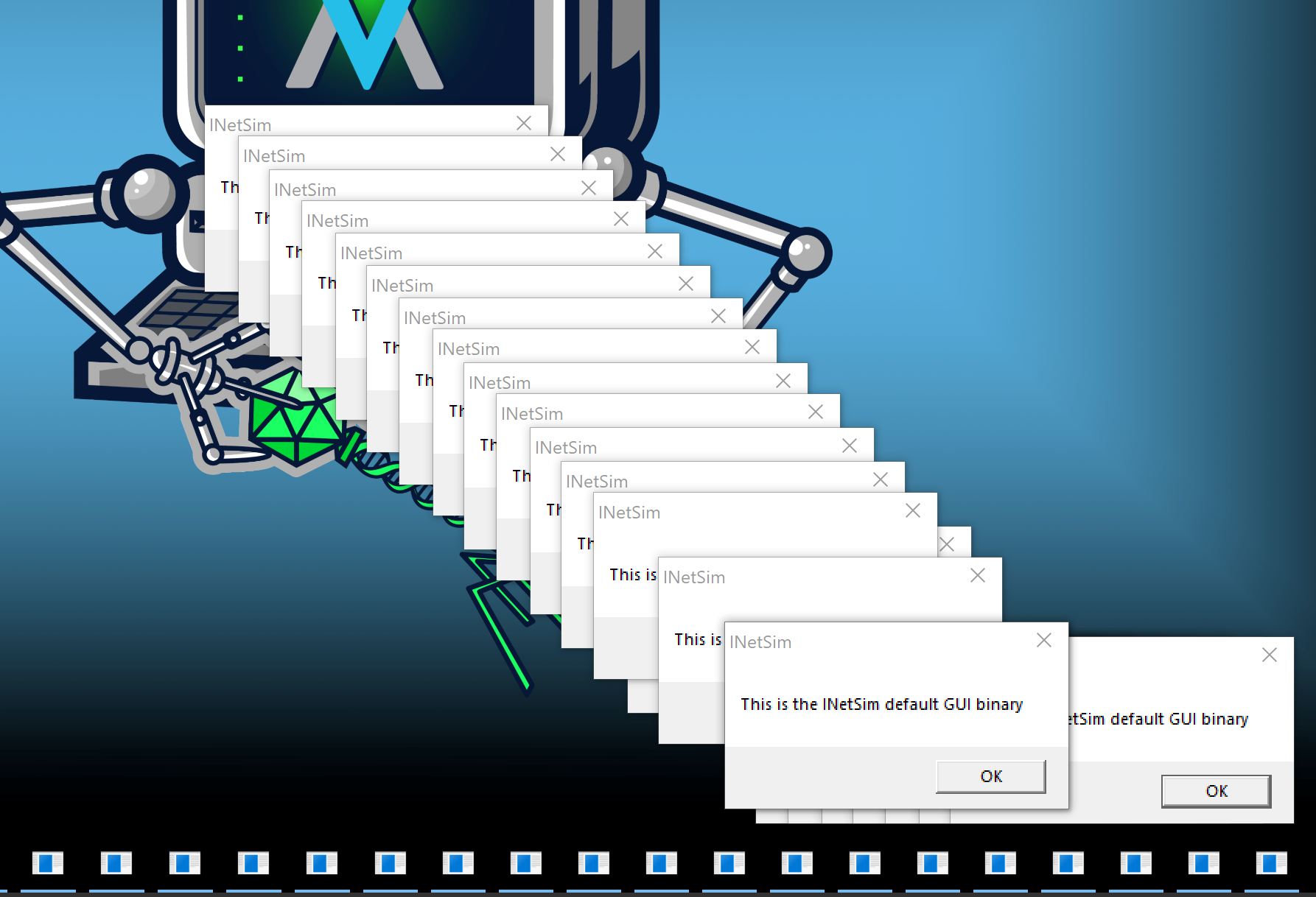
I have INetSim configured to return a default dummy .exe file if one is requested, and that's exactly what happened here. The malware requested the file, downloaded it, and executed it. This left me with several questions. I was fairly confident that the malware was actually expecting a PE file, since it executes the response. However, does the actual intended payload have a specific purpose, or is this a more generic downloader feature? Did the malware author intend to pull several different binaries and run them, or were they expecting only a single one to run? Is there a limit to the number of GET requests, or would my lab setup keep launching the INetSim default GUI binary until the heat death of the universe?
This functionality definitely warrants some further investigation.
Where to next?
After some basic static and dynamic analysis, I now had an idea of what this sample does: it copies itself to several folders on the system and removable drives (and likely network shares), downloads PE files, and it runs them. I still have a lot of questions, however:
- Does this malware attempt any other persistence mechanisms? What are they?
- This sample was tagged as "Amadey", which is an infostealer family. Does this PE file actually steal any info, or does it just load a later stage of Amadey?
- There are several interesting imports that we haven't observed activity from yet. How are COM objects used? Are the clipboard-related functions used? Does this malware do anything interesting based on the user's SID?
In the next blog post, we'll dive into these questions and more.